Deepfake Detection
Deepfake Detection technology aims to detect voice deepfakes, synthesis, and morphing.
This page explains how to use Phonexia Deepfake Detection in our web application. If you want to dive deeper into the inner workings of this technology, check out our detailed technical documentation.
Files can also be sent to and received from other Phonexia technologies. Learn more about sending files here
Uploading files
Upload your files or create your own recordings by using the built-in recording feature. If you don't have your own files, you can use the provided Phonexia examples to explore how Deepfake Detection works. Learn more about uploading files here.
Files can also be sent to and received from other Phonexia technologies. Learn more about sending files here.
Once the suspicious recordings you wish to verify are uploaded in the left panel, you will see the option to add a reference recording—an authentic recording of the speaker from the suspicious recording. Adding a reference helps deliver more reliable results.
Be aware that using a reference recording requires uploading only single-channel recordings for both the suspicious and reference audio. If the uploaded audio is multi-channel, only the first channel will be used.
Leaving the page for an extended period while awaiting the results may interrupt the process. If this happens, you will need to restart the audio processing.
Results
Once processing is complete, the results will be displayed in the right panel.
If a deepfake is detected, a red warning icon with a score is displayed next to a “likely deepfake” warning. The user can view more details by clicking “details”, which reveals a colorful scale. The scale ranges from -10 to 10 — with positive (red) values indicating a deepfake and negative (green) values suggesting an authentic voice.
The displayed ranges are restricted in the graphical interface to cover the most likely results for recordings. Therefore, some results may occasionally fall outside this range in the exported file.
Export formats
Once your results are ready, you can export them in a range of formats.
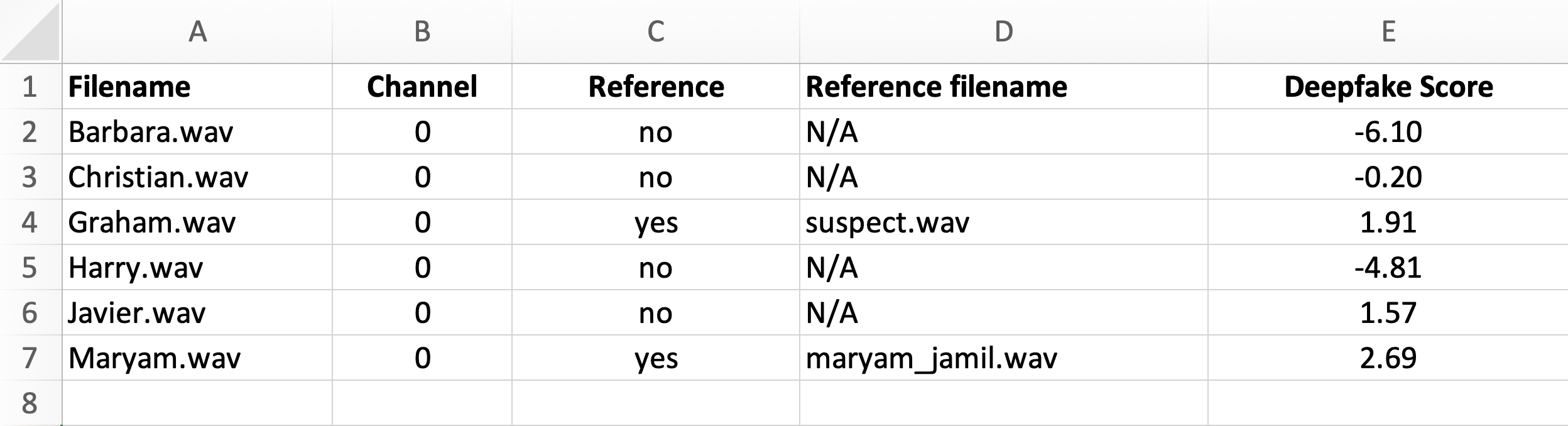
CSV and XLSX
Deepfake detection results include the channel number, reference filename if present, and the score.

JSON
If deepfake detection has been used without a reference recording, the JSON file contains both channel information and score.
{
  "channels": [
    {
      "channel_number": 0,
      "score": 1.7896760702133179
    }
  ]
}
Given that using a reference recording is strictly limited to single-channel recordings, the export will only show the score.
{
  "score": 0.8396760702133179
}
The same results can also be exported in bulk as a ZIP file.
All results
Additionally, users have the option to export a summary file that displays the scores for all the selected recordings.